

Short answer
To choose light gauge steel software, ask for a demo on your own plan. Check whether it reads the plan, builds panels and the roof in one model, writes a file your machine accepts, what it checks before export, and what it does not claim about structural adequacy. Decide on your own work, not on a sample project.
Key points
- Ask for the demo on your own plan, not a sample project.
- The real measure is how many manual hand-offs remain between plan and machine.
- The production file must match your machine's line format.
- Ask exactly what the error check inspects.
- Software does not approve load-bearing capacity; that approval belongs to the project engineer.
In this article
Introduction
Light gauge steel software is not a drawing tool that merely looks good on screen. Every profile you draw becomes a real part that is cut, punched and screwed on site. So the choice should not come from comparing feature lists, but from looking at how your own work passes through the program. This article gives the questions to ask before you buy, in order.
First be clear about what you are buying
Programs called light gauge steel software, LGS software or cold formed steel framing software do not all do the same job. Some only draw, some focus on engineering calculation, some write production files. Three questions make your need clear. Where does your plan come from? Where does the output go: to a machine, a client or an engineer? Which manual step takes the most time today?
10 questions to ask the software
| Question | Why it matters | How to see it in a demo |
|---|---|---|
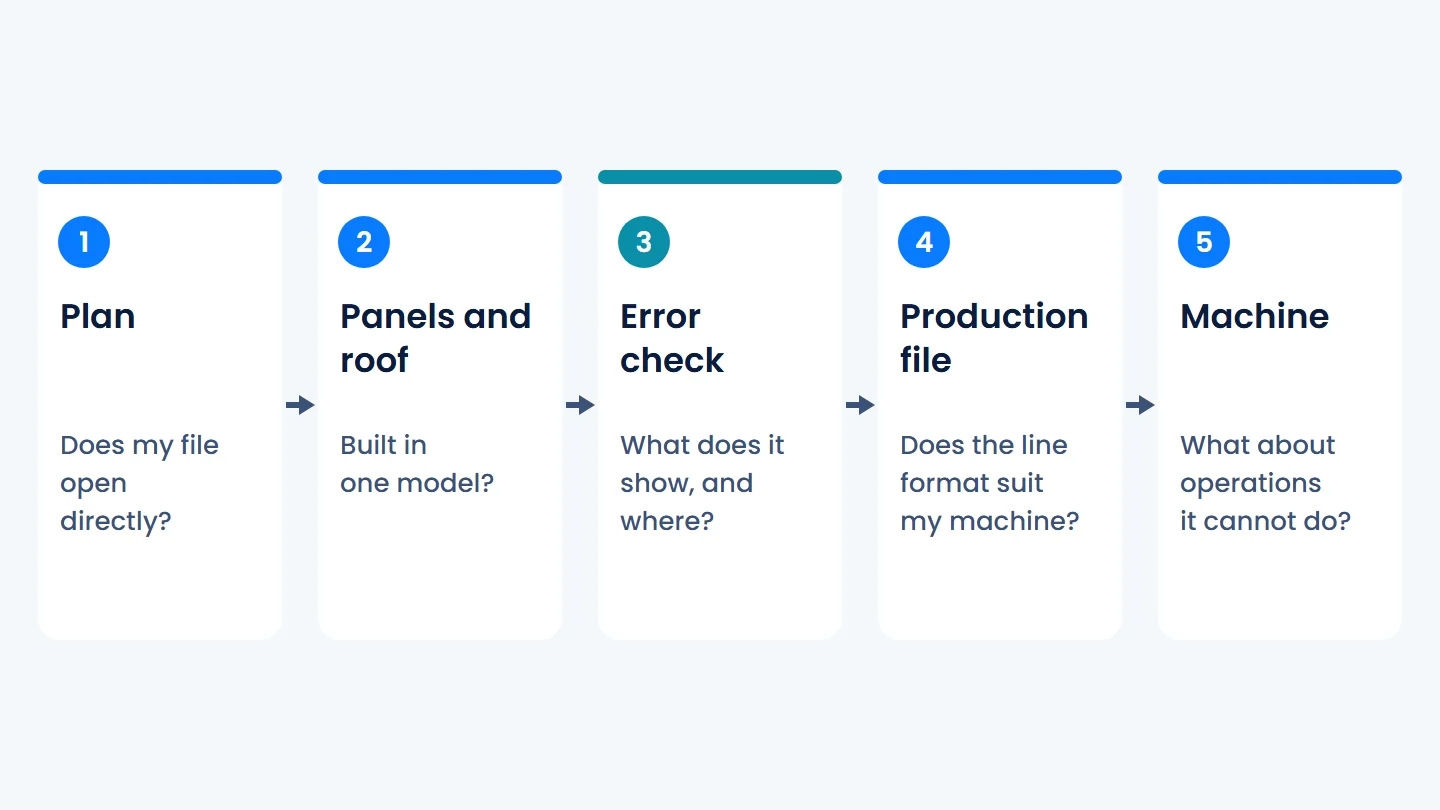
| 1. Does it open my plan directly? | If the plan is redrawn, the first error starts there | Have your own file opened |
| 2. Does it recognise walls and openings? | Doors and windows change the inside of the panel | Change the type of an opening |
| 3. Are panels and roof in one model? | A separate file means a separate update | Have the roof built in the same file |
| 4. Does the production file suit my machine? | Line format varies by machine | Compare with a sample file from your machine |
| 5. What happens to an operation my machine cannot do? | The problem should not first appear in the factory | Export with a station switched off |
| 6. What does it check before export? | "Checked" means little on its own | Ask for the list of checks |
| 7. Does it show where the error is? | A warning without a location creates work | Give it a deliberately faulty model |
| 8. Do takeoff and presentation come from the same model? | Moving to another program is data entry again | Ask for a takeoff from the same file |
| 9. Where does engineering approval begin? | The line between software and engineer must be clear | Ask which warnings need approval |
| 10. How do licence and updates work? | Projects and settings must be kept | Ask what an update preserves |
These questions are not a score sheet. Pick the three or four that matter in your work and build the demo around them.
How should you ask for the demo?
A prepared sample project looks good in any program. The real information appears the moment your own work enters it.
- Bring a real plan: one with doors, windows and recesses.
- Follow one profile: from the wall on the plan to its line in the production file.
- Change the plan: move an opening and see what is rebuilt in the model.
- Make a mistake: see where and how the warning arrives.
- Bring production and engineering to the table: they do not ask the same questions.
Which claims should you question?
A marketing line is not bad in itself, but without a scope it cannot support a decision. When you hear these four sentences, ask what is behind them:
- "Works with every machine": Which line format, which stations?
- "Error-free production": Which errors, caught by which check?
- "It does the calculation": Under which text, and who approves the result?
- "Code compliant": Does the software approve compliance, or does the engineer?
Does Turkey's 2027 regulation affect the choice?
It does, indirectly. The light steel regulation taking effect on 1 January 2027 brings rules for materials, thickness, holes and fabrication checks. Applying those rules is a project and production decision. What you can expect from the software is to keep sections and production settings in a way that lets you follow them. In the demo, check that you can work with your own section.
Read nextTurkey's light steel regulation takes effect on 1 January 2027: what changes?Where does QSteelCAD stand on this list?
We ask ourselves the same questions. These are the features that work today:
- It opens DXF plans. It does not read DWG; save the file as DXF.
- It recognises walls, doors and windows on the plan and builds panels with studs, lintels and bracing.
- It adds hip, gable and mixed roofs to the same model with trusses, ceiling and roof panels.
- It writes every profile to your rollforming machine file with its length, holes and notches. An operation the machine profile does not support is not written to the line.
- Before the file goes to the machine, it passes rivet hole, minimum length and clash checks.
- Renders, takeoff and cost come from the same model.
- It runs on Windows 10 and Windows 11, with a Turkish and English interface. Updates keep your licence, settings and projects.
QSteelCAD does not calculate load-bearing capacity. It flags joints that need approval; structural adequacy stays with the project engineer. The best way to see whether the program suits your work is with your own plan.
Frequently asked
What should you look at first when choosing light gauge steel software?
How your own plan passes through the program to your machine. Ask for the demo on your own plan, not a sample project, and follow one profile from the plan to the production file.
Is LGS software the same as cold formed steel framing software?
Yes. LGS stands for light gauge steel, also called cold formed steel. The real difference is not the name but whether a program draws, calculates, produces, or combines these.
Does steel house drawing software also give production files?
It depends on the program. With a tool that only draws, the profile list and production data are prepared separately. Before you buy, ask whether the output is a file your machine reads.
Can light gauge steel software replace the engineer?
No. The program builds the model and runs production checks. Structural adequacy, including bracing and section choices, is for the project engineer to approve.
This article is general information. It does not replace project calculations, an engineer's approval or the official text. Articles and values were read from the texts in force on the article's date.